In the video and instructions below, you can find out how to descale your Cafissimo LATTE.
The descaling procedure consists of a descaling- and rinsing cycle, and takes about 25 minutes to complete.
Article Published Date : 24 June 2026
In the video and instructions below, you can find out how to descale your Cafissimo LATTE.
The descaling procedure consists of a descaling- and rinsing cycle, and takes about 25 minutes to complete.
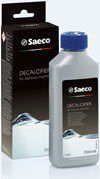
Use the original SAECO CA6700 descaling solution and never interrupt the descaling or rinsing cycles.
1) Switch the machine off by pressing the On/Off button.
2) Check that the milk carafe is correctly inserted and filled with water up to the MIN level.
3) Make sure that there is no capsule in the compartment and that the lever is in the closed position.
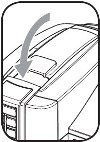
4) Remove and empty the water tank, drip tray and used capsule drawer.
5) Empty the complete SAECO CA6700 descaler solution (250 ml) into the water tank and fill it with fresh water up to the MAX level.
6) Put the water tank back into the machine.
7) Remove the metal cup tray from the drip tray and push the drip tray all the way into the machine.
8) Raise the coffee dispensing spout into the horizontal position.
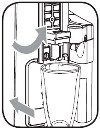
9) Place a bowl with a minimum capacity of 1 litre under the coffee and milk dispensing spouts to collect the descale solution.
10) Press the (green) On/Off button and the (white) cappuccino button simultaneously and hold them until the (orange) service indicator and the (white) espresso button are lit.
(This can take up to 3 seconds.)
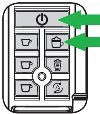
11) Press the (white) espresso button to start the descaling cycle.
The machine dispenses the descaling solution at regular intervals via the coffee and the milk spouts.
The (white) espresso button flashes throughout the descaling cycle.
12) At the end of the descaling cycle the (orange) service indicator light starts to flash and the (white) cappuccino button will light up automatically once all the descaling solution has been dispensed.
13) Empty the bowl and drip tray and place them back.
14) Rinse the water tank thoroughly, fill it up to the MAX level with fresh drinking water and place it back on the machine.
Note: Make sure that the water tank is filled up to the MAX indication otherwise you might need to repeat steps 14 to 16 once more!
15) Press the (white) cappuccino button to start the rinsing cycle.
16) The machine dispenses the solution at regular intervals via the coffee and the milk spouts.
The (white) cappuccino button flashes throughout the rinsing cycle.
17) When the rinsing cycle has finished, all the lights will flash five times and the machine will turn off.
18) Remove the bowl and empty the drip tray.
19) Place the metal cup tray and insert the drip tray back into the machine.
20 Rinse the milk carafe and water tank, fill the water tank up to the MAX level and place it back on the machine.
21) Now your machine is ready to brew coffee again.

